Oct 13, 2025
How Layout Mobile Turns In-Store Traffic Into Repeat Customers
Layout Tap
Before you begin
Your Layout Mobile account
To use Tap, you’ll need an active Layout Mobile subscription. Tap is built directly into the Layout ecosystem and works automatically with your existing mobile app, branding, and Square connection. There is no separate setup, third-party service, or manual configuration required to get started.
Included NFC hardware
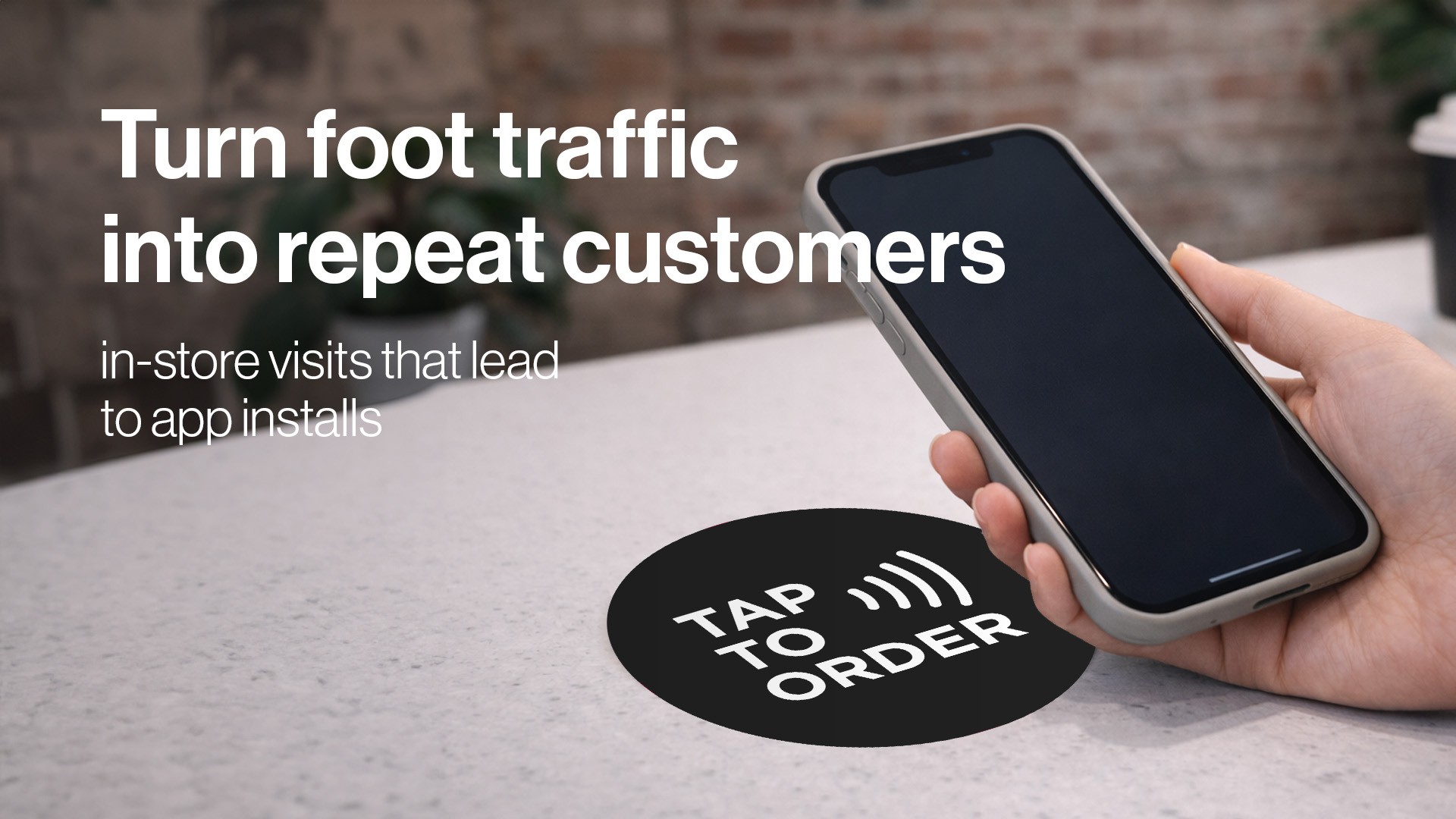
When you sign up for Layout Mobile, your business automatically receives a starter set of NFC stickers. These are designed to be simple, durable, and effective in real-world environments where customers already interact with your brand.
Multiple NFC stickers included at signup
Approximately 3-inch circular stickers
Clean, minimal design with a simple tap-to-download message
No batteries, pairing, or technical setup required
The goal behind Tap
Tap exists to solve one of the biggest problems with mobile apps for local businesses: adoption. Most customers will not search the App Store, remember an app name, or scan a QR code later. Tap removes that friction by turning a physical interaction into an instant digital connection.
Why Tap exists
The gap between foot traffic and digital engagement
Businesses see hundreds or thousands of customers in person every week, yet only a small percentage ever download the app. The problem is not interest, it is effort. Tap bridges the gap by meeting customers in the moment, inside your space, when engagement is already high.
Turning in-store moments into installs
Tap converts physical foot traffic into app installs with a single interaction. Customers simply tap their phone on a sticker and are taken directly to the correct app store for their device. There is no typing, no searching, and no guessing.
Building long-term customer value
An app install is not the end goal. It is the beginning of a direct relationship. Once customers install your app, you can reach them with loyalty rewards, promotions, push notifications, and repeat ordering. Tap helps you build an audience you can engage again and again.
How Tap works
Simple tap interaction
Tap uses built-in NFC technology on modern smartphones. Customers tap their phone on the sticker and their device automatically opens the correct destination. No camera needs to open and no scanning app is required.
Automatic device routing
Tap detects the customer’s device type in real time. iPhone users are sent directly to the App Store. Android users are sent directly to the Play Store. If a device does not support NFC or is on desktop, the user is routed to your marketing site instead.
Dynamic links that never go stale
The NFC stickers do not store fixed URLs. All taps route through Layout’s infrastructure, which means app links can be updated at any time without replacing physical stickers. This ensures your hardware remains usable long-term.
Tap analytics and visibility
Built-in tracking
Every tap is tracked server-side through Layout. This provides reliable data without relying on client-side scripts, cookies, or user accounts.
What you can see in the Dashboard
Inside the Layout Dashboard, you can view tap activity and performance metrics tied directly to your business.
Total taps over time
Device breakdowns across iOS, Android, and desktop
Where customers are being sent after tapping
Usage trends by day and time
Using analytics to optimize placement
Tap analytics help you understand which sticker placements are driving the most engagement. This allows you to move, add, or remove stickers based on real performance rather than guesswork.
How Tap helps drive sales
Lower friction leads to higher conversion
The fewer steps required, the more likely customers are to install your app. Tap removes multiple barriers and significantly increases conversion rates compared to traditional QR codes or verbal prompts.
More installs create more repeat orders
Customers who install your app are more likely to return, place repeat orders, and engage with loyalty programs. Tap increases the size of your reachable customer base without increasing advertising spend.
Designed for real-world placement
Tap stickers are meant to live where customers naturally pause. Registers, pickup counters, tables, and entrances are all ideal locations. These moments are when customers are most likely to engage.
After setting up Tap
Step 1: Place your stickers
Apply NFC stickers to clean, visible surfaces throughout your space. Choose locations where customers naturally wait or interact with your business.
Step 2: Let customers tap
No explanation is required. The sticker messaging is intentionally simple and clear. Customers tap and their phone handles the rest.
Step 3: Monitor performance
Use the Layout Dashboard to monitor tap activity in real time. Identify high-performing areas and adjust placement as needed.
Step 4: Scale with confidence
As your business grows, Tap scales with you. Additional NFC tags, advanced analytics, and future features can be added without changing the customer experience.
The bigger picture
More than just NFC
Tap is not just a sticker. It is a bridge between your physical space and your digital platform. It connects in-person experiences to long-term customer relationships.
Built for modern businesses
Tap is designed for coffee shops, restaurants, and retail brands that want simple tools that actually drive results. No clutter, no gimmicks, just clear value.
Our mission
The mission behind Tap is simple: turn everyday foot traffic into lasting digital engagement. When your customers do better, your business does better. Tap is one of the simplest and most effective ways to make that happen.